
Can Office Ergonomics Reduce Employee Discomfort?




Can Office Ergonomics Reduce Employee Discomfort?
Employee discomfort is often discussed as if it were a single problem: an aching back, sore shoulders, tired eyes, or the familiar stiffness that appears late in the workday. In practice, it is usually a chain of small mismatches. A chair may not support the user’s working posture. A monitor may sit too low. A desk may be fixed at a height that suits only part of the workforce. Nearby conversations, calls, and visual movement may make concentration harder, causing people to tense their shoulders or remain in an awkward position longer than they realize.
So, how can office ergonomics reduce employee discomfort? It can reduce avoidable physical and environmental stress by giving people more usable adjustment, better task support, quieter focus options, and layouts that fit the work being done. It is not a promise that furniture alone will solve every musculoskeletal or well-being concern. It is a practical way to remove recurring sources of strain from the daily work environment.
For corporate procurement teams, facility managers, HR leaders, architects, and workplace designers, the useful question is not whether an office looks ergonomic in a showroom. It is whether the system continues to work for different body sizes, changing tasks, shared desks, hybrid schedules, digital equipment, and long operating hours.
Discomfort Starts with the Workstation, but It Does Not End There
A conventional workstation can create friction when its fixed dimensions force workers to adapt their bodies to the furniture. Someone may perch on the front edge of a seat because the backrest does not meet the lumbar area correctly. Another person may elevate their shoulders because the worksurface is too high. A laptop user may bend the neck forward for hours because the screen and keyboard cannot both be positioned well without separate accessories.
These are not always dramatic failures. They are repetitive exposures: static sitting, unsupported reaching, wrist extension, twisting to access equipment, or sustained visual focus at an unsuitable distance. Over time, workers may describe fatigue before they describe pain. They change positions frequently, avoid a particular desk, take informal breaks simply to reset their posture, or report that concentration drops in the afternoon.
Good ergonomics recognizes that people are variable and work is variable. A workstation used for data entry, design review, video calls, technical drawing, and focused analysis should not be evaluated as though it supports only one posture and one device. The goal is not to lock someone into a perfect pose. It is to make healthy movement and workable posture easier throughout the day.
Adjustable Chairs Need More Than a Comfortable Seat
Task chairs are often the first item considered in an ergonomic upgrade, and for good reason. They affect pelvic position, spinal support, arm placement, circulation, and the user’s ability to reach the desk without leaning forward. Yet a chair marketed as ergonomic may still perform poorly if its controls are hard to use, its adjustment range is narrow, or its support does not remain effective when the user reclines or changes tasks.
The most relevant features depend on the workforce and task pattern, but buyers commonly examine seat-height adjustment, seat-depth adjustment, backrest recline, tension control, armrest positioning, and lumbar support. Adaptive lumbar systems can be valuable where multiple users share seating, though “adaptive” should not become a vague substitute for checking how the support actually feels across body types. A prominent lumbar pad is not automatically better; support that is too aggressive or incorrectly located can be uncomfortable as well.
Material choices deserve attention too. Mesh can help with airflow in warm or densely occupied offices, but the quality of the suspension, frame, edge support, and long-term tension retention matters. Upholstered chairs may offer a different pressure distribution and visual character, yet cleaning requirements, foam durability, and fabric performance need to match the operating environment. For intensive-use settings, procurement review should also consider durability testing evidence and applicable requirements such as BIFMA X5.1 or EN 1335 where relevant to the project and market.
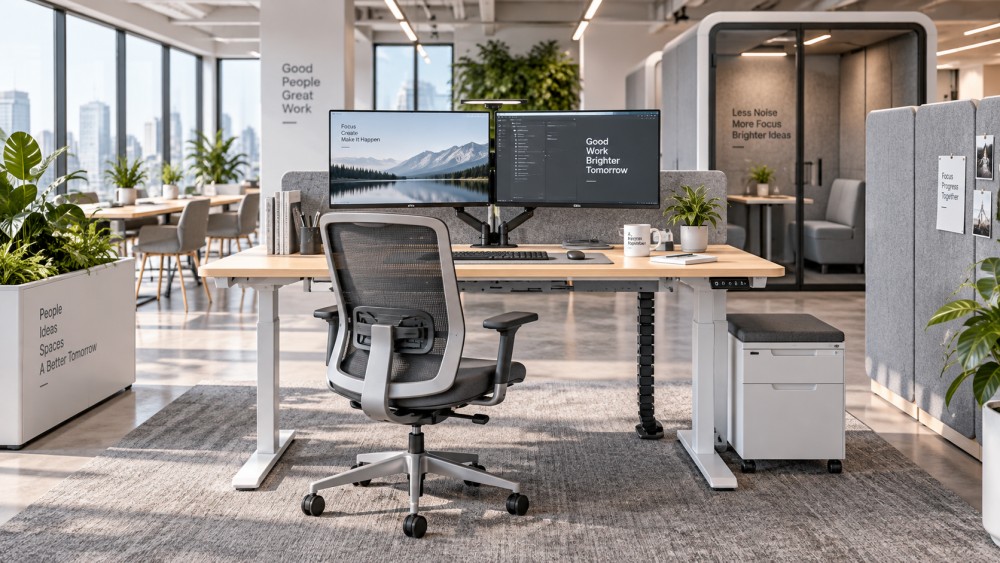
Sit-Stand Desks Reduce Static Exposure Only When They Are Usable
Sit-stand desks are frequently associated with reducing sedentary behavior, but the more immediate workplace benefit is often the ability to change position without abandoning the task. Alternating between sitting and standing can relieve the feeling of being fixed in one posture, particularly during long computer-based work. It should not be treated as an instruction to stand continuously. Standing for extended periods can create discomfort of its own, especially when footwear, flooring, work habits, or task demands are not considered.
The desk must accommodate the real workstation load. A light laptop setup and a workstation with multiple monitors, docking equipment, monitor arms, and desktop peripherals place different demands on the lifting system. For electric desks, buyers should review rated load, usable height range, stability at working height, cable routing, controller behavior, and service access. A dual-motor system may be appropriate for heavier or wider configurations, but motor count alone does not establish desk quality. Frame design, synchronization, column performance, control electronics, and assembly precision all influence daily use.
Safety features should also be evaluated in context. Anti-collision controls can help reduce the risk of contact during movement, but they do not remove the need for sensible clearance planning. Desk position, under-desk pedestals, cable trays, monitor arms, and adjacent storage all affect how safely a workstation operates. Hall sensors, control logic, and soft-start or soft-stop behavior may be part of a supplier’s technical specification; facility teams should ask how those features are tested and maintained rather than relying on broad feature labels.
Noise Is an Ergonomic Issue, Not Only an Acoustic One
Physical discomfort and cognitive discomfort often overlap. In an open office, persistent speech noise, video calls, and nearby movement can make focused work difficult. Employees may wear headphones all day, move to unsuitable spaces, or hunch over a laptop in search of privacy. The result is not simply annoyance. It can alter work behavior in ways that increase visual, neck, and shoulder strain.
Acoustic office pods, phone booths, partitions, ceiling treatments, and sound-absorbing materials can help when they are selected as parts of a coordinated acoustic strategy. A pod is not automatically “soundproof,” and an NRC rating for an absorptive material does not describe every aspect of room acoustics or speech privacy. Absorption, isolation, sealing, glazing, ventilation noise, door design, and the surrounding floor plan all influence the result.
For example, a phone booth may provide a practical place for short calls, while a larger acoustic pod may support video meetings or concentrated individual work. However, if ventilation is inadequate, lighting is uncomfortable, power access is unreliable, or occupancy patterns are unmanaged, employees may avoid using it. The best solution is often a mix: quiet rooms for longer focused tasks, small call spaces for brief conversations, acoustic treatment in open zones, and behavioral norms that prevent every desk area from becoming a meeting area.
Layout Determines Whether Ergonomic Furniture Gets Used Properly
An office can contain excellent chairs and height-adjustable desks while still creating discomfort through poor planning. Narrow circulation routes may make it hard to adjust chairs or access storage. Shared workstations may lack space for personal device setups. Meeting rooms may encourage laptop work at tables designed mainly for short discussions. Lounge areas may be attractive but unsuitable for prolonged screen-based tasks.
Flexible furniture can help, especially in hybrid offices where space changes function throughout the week. Flip-top training tables, movable partitions, modular meeting furniture, and integrated power can make it easier to transition between learning sessions, project work, and team meetings. But flexibility should not become instability. Furniture that is difficult to move, awkward to reconnect, or dependent on loose cables tends to remain in one position, regardless of the intended planning concept.
Public-facing environments require another level of judgment. Airport, transit, reception, and waiting-area seating must support high traffic, cleaning routines, luggage movement, charging needs, and varied dwell times. Ergonomics in these spaces is less about intensive task posture and more about accessible sitting, robust materials, stable construction, sensible spacing, and the ability to withstand repeated use without becoming unsafe or difficult to maintain.
A Procurement Checklist Should Connect Comfort to Lifecycle Reality
When discomfort is the concern, buyers can make better decisions by moving beyond catalogue images and general claims. A useful evaluation process usually includes mock-ups, representative user trials, task observation, and technical documentation. It should involve more than a single decision-maker. Facilities teams understand cleaning, repairs, and installation constraints; IT teams understand power and device requirements; HR teams may identify recurring well-being concerns; designers can assess layout and user experience; procurement teams need clarity on specification, warranty, lead time, and replacement parts.
- Confirm the task profile: focused computer work, collaborative work, call-heavy work, training, visitor waiting, or a combination.
- Check usable adjustment ranges rather than assuming one setting fits everyone.
- Review how desks perform with the intended monitors, cable management, and peripheral load.
- Ask for relevant test reports, material information, and market-specific compliance documentation where required.
- Assess maintenance needs, spare-part availability, assembly quality, and control-system support.
- Include acoustics, lighting, screen placement, and access to quiet workspaces in the same project review.
There is also a human implementation issue. An adjustable chair or desk offers little value if employees do not know what can be adjusted or feel uncomfortable changing it. Brief onboarding, clear workstation guidance, and a culture that permits people to take posture breaks are often more effective than a lengthy training campaign. The emphasis should be practical: adjust the chair before the first week ends, set screens for the actual task, and report equipment that cannot be made comfortable.
Avoid the “One Product Solves Everything” Mistake
A premium chair will not compensate for a cramped workstation. A sit-stand desk will not resolve discomfort caused by constant noise. An acoustic pod will not replace enough meeting capacity in a busy office. Nor should organizations assume that every discomfort complaint is caused solely by workplace furniture. Individual health needs, work intensity, device habits, lighting conditions, and management practices may all require consideration.
That is why ergonomic planning is most useful when it combines biomechanics, acoustic control, material safety, workplace behavior, and operational maintenance. Low-VOC materials, for instance, may be relevant to indoor environment goals, but they should be reviewed alongside project requirements, documentation, installation conditions, and local expectations. Similarly, a well-designed cable management system can seem minor until it prevents clutter, tripping risks, awkward reaching, and improvised power arrangements across an entire floor.
Global Office Ergonomics & Acoustic Systems (OEAS) approaches these questions as connected workplace systems rather than isolated furniture categories. Its coverage of ergonomic seating, electric desk mechanisms, acoustic pods, workspace partitions, conference furniture, public seating, and future workplace technology reflects the way real projects are evaluated: through user comfort, technical performance, compliance readiness, durability, maintenance, and fit with the wider space.
The Practical Answer
Office ergonomics can reduce employee discomfort when it gives workers realistic control over posture, supports movement, reduces unnecessary reaching and visual strain, and provides environments where concentration does not require physical compromise. The strongest projects do not begin with a fashionable product category. They begin by identifying where people experience friction during the workday, then matching furniture, acoustics, technology, and layout to those conditions.
Before specifying a solution, confirm the user population, daily task patterns, equipment loads, acoustic conditions, cleaning and maintenance responsibilities, and any standards or documentation required for the destination market. That process may take more effort than selecting from a visual catalogue, but it is far more likely to produce an office employees can use comfortably over time.
Related News
- Seat Pressure Mapping Analysis: How to Interpret Office Chair Test ResultsOct 27, 2026Seat pressure mapping analysis made practical: learn to interpret hotspots, contact area, and load distribution to compare office chairs confidently and make smarter purchasing decisions.
- Choosing a Seating Pressure Distribution Sensor for Office Chair TestingOct 17, 2026Choose the right seating pressure distribution sensor for office chair testing. Compare calibration, accuracy, and repeatability to make confident buying decisions.
- Open-Plan Acoustics Design: Reducing Speech Noise Without Blocking TeamworkOct 04, 2026Open Plan Acoustics design helps reduce speech distractions without limiting teamwork. Discover practical zoning, absorption, pods, and privacy strategies for productive offices.
- When to Hire an Open-Plan Noise Control Consultant for an Office Fit-OutOct 02, 2026Open plan noise control consultant: learn when to bring in expert acoustic guidance for office fit-outs, protecting focus, privacy, and productivity before costly changes.
Related News
- 00
0000-00
59th CIFF Guangzhou Opens Exhibitor Registration for Commercial Furniture Show - 00
0000-00
Choosing Acoustic Desk Dividers for Offices: Height, Materials and Placement - 00
0000-00
Commercial Seating Prices: What Drives Costs and How to Budget - 00
0000-00
Orgatec 2026 Review: Height-Adjustable Desks and Acoustic Systems Lead Office Trends - 00
0000-00
Sourcing Desk Lifting Systems from China: What Buyers Should Check
Weekly Insights
Stay ahead with our curated technology reports delivered every Monday.