
Desk Cable Management Ideas for Open Offices: Trays, Grommets, and Under-Desk Routing




Why desk cable management matters more in open offices
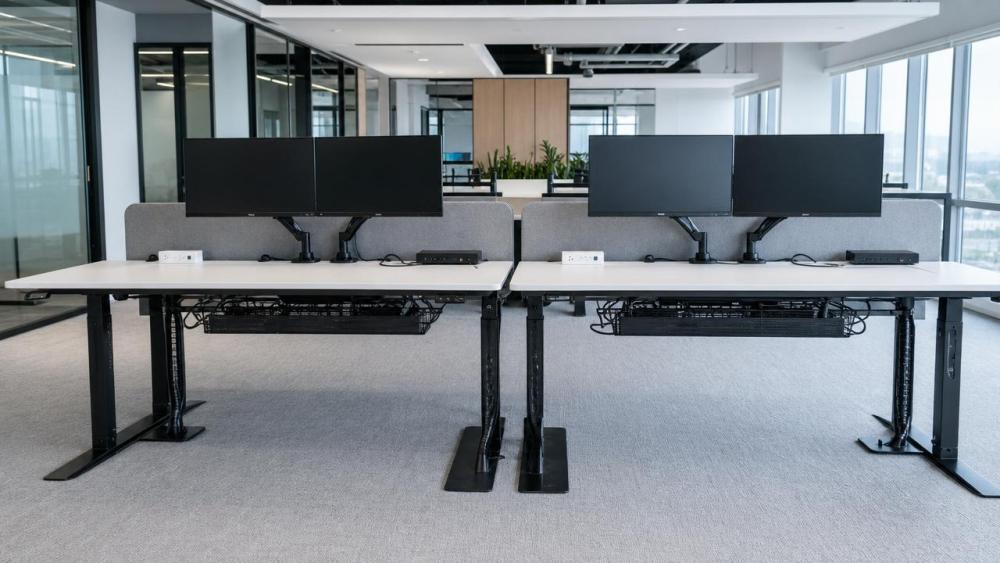
In open-plan workplaces, cables affect more than appearance.
They influence safety, cleaning access, reconfiguration speed, and daily comfort around every workstation.
Good desk cable management keeps power leads, monitor cords, docking lines, and chargers controlled without restricting movement.
That becomes especially important where sit-stand desks, shared benches, acoustic pods, and mobile collaboration furniture coexist.
On projects connected to ergonomic furniture and future workplace systems, cable routing is rarely a minor accessory decision.
It sits between ergonomics, mechatronics, maintenance, and visual workplace quality.
The most useful desk cable management ideas for open offices usually combine trays, grommets, and under-desk routing.
Still, the right mix depends on how desks move, how often teams change layouts, and how visible the installation remains.
Actual use conditions shape cable needs differently
A fixed executive workstation and a dense benching area may use similar devices, yet require different desk cable management strategies.
The reason is simple.
Cable volume, motion range, cleaning frequency, and user turnover do not stay the same across open offices.
A single monitor with one power source is easy to hide.
A dual-screen sit-stand desk with laptop dock, task light, USB charging, and privacy screen needs more disciplined routing.
In practical planning, the first question is not which accessory looks cleanest.
It is whether cables must move, stay accessible, or remain almost invisible.
That is why OEAS-style workplace analysis often treats cable management as part of workstation performance, not just furniture finishing.
A quick way to compare scenario differences
This comparison helps avoid treating every open office desk as the same cable environment.
Where trays work best and where they fall short
Cable trays are often the backbone of desk cable management because they collect power bricks, excess cord length, and adapters in one place.
In long benching runs, trays reduce visual clutter quickly.
They also protect cables from vacuum contact and accidental foot interference.
This matters in offices with frequent cleaning or heavy circulation near workstation legs.
Yet trays are not automatically the best answer everywhere.
On sit-stand desks, a tray that is too shallow or too rigid may create pinch points.
On compact desks, it can also reduce knee clearance if mounted poorly.
A more reliable approach is to check three conditions before specifying trays.
- Whether the desk frame leaves enough mounting depth and legroom.
- Whether power modules and adapters generate heat that needs ventilation.
- Whether maintenance staff can access the tray without dismantling the workstation.
In open offices using smart desks, trays should also respect control boxes, lifting columns, and anti-collision components.
Grommets make more sense when access matters
Desk grommets are sometimes treated as cosmetic details.
In reality, they shape how cables enter and leave the work surface every day.
For open offices with laptop docking, monitor arms, and frequent charging, grommets support cleaner top-surface organization.
They also reduce the habit of dragging cables over the desktop edge, which usually causes faster wear.
Grommets become especially useful when the workstation must stay visually calm, such as client-facing team areas or executive bench spaces.
Still, not every cutout location works well.
If the grommet sits too far from monitor mounts, cables loop across the desk anyway.
If it sits near moving arms or split tops, routing becomes awkward.
The better judgment is to place grommets based on device behavior, not symmetry alone.
When grommets improve the setup most
- Dual-monitor desks needing short, direct cable drops.
- Shared desks where charging cables must be easy to replace.
- Training and conference furniture using temporary devices.
- Workstations near partitions where rear access is limited.
Under-desk routing becomes critical with moving desks
Open offices increasingly use electric sit-stand desks, and that changes desk cable management priorities immediately.
The issue is not only hiding cables.
It is managing motion through the full lifting range without strain, snagging, or connector fatigue.
Under-desk routing works well here because it keeps cables close to the moving structure.
That reduces swing and protects cords from chair casters or feet.
In these applications, cable loops need controlled slack rather than extra length thrown into a tray.
Power and data should also be separated where possible.
This is a practical choice for maintenance clarity and for avoiding tangled bundles around control boxes and lifting hardware.
In real installations, the best under-desk routing plan usually follows the desk’s movement path first, then the visual path second.
Benching, pods, and mixed-use zones need different judgment
Not all open office zones behave like standard desk rows.
Benching clusters often need scalable desk cable management because one change affects several seats at once.
In that case, segmented trays, shared power spines, and clear identification help more than highly customized routing.
Acoustic pods and focus booths create another situation.
Here, cables must stay hidden to preserve the enclosed experience, but access still matters for ventilation checks, charging upgrades, and device replacement.
Mixed-use lounge or touchdown areas usually call for lighter cable routing.
Users connect briefly, so simple pass-through points and protected floor-to-desk transitions may be enough.
What changes across these zones is not the importance of desk cable management.
It is the balance between concealment, access, density, and reconfiguration speed.
A practical selection guide
Common mistakes appear before installation, not after
Many cable problems begin in planning assumptions.
One common mistake is choosing desk cable management by accessory type alone.
A tray may be strong, but still wrong for a frequently adjusted desk.
Another mistake is counting today’s devices only.
Open offices often add task lights, booking panels, extra screens, or charging modules later.
Ignoring future cable load makes neat installations fail early.
A third misjudgment is separating furniture planning from cleaning and maintenance routines.
If staff cannot reach a failed adapter quickly, downtime spreads across the workstation row.
The more mature view is to assess desk cable management as part of lifecycle performance.
What to confirm before choosing a final routing approach
Before locking in trays, grommets, or under-desk routing, a short site review saves time later.
- Map every powered device, including future add-ons.
- Check desk movement, frame geometry, and leg clearance.
- Separate user-facing cables from service-only connections.
- Review cleaning tools, floor boxes, and access intervals.
- Test one pilot workstation before scaling across the floor.
That process usually reveals whether a clean-looking concept can also survive real daily use.
For open offices linked to ergonomic systems, smart desk controls, and flexible layouts, desk cable management works best when it is planned as infrastructure.
The next step is to compare actual workstation conditions, define cable load and movement needs, and build a routing standard that fits future changes as well as present order.
Related News
- Office Furniture Modular Design for Space Saving: Best Layouts for Growing TeamsJun 15, 2026Office Furniture Modular Design space saving ideas for growing teams: explore benching, neighborhood, perimeter, and hub layouts to boost capacity, flexibility, and productivity.
- What Does a Corporate Office Design Consultant Actually Do in a Workplace Project?Jun 12, 2026Corporate office design consultant services go beyond layouts—aligning ergonomics, acoustics, technology, and compliance to create productive, flexible workplaces. Learn how this role drives better ROI.
- Desk Cable Management Ideas for Open Offices: Trays, Grommets, and Under-Desk RoutingJun 11, 2026Desk cable management ideas for open offices: learn how trays, grommets, and under-desk routing improve safety, flexibility, and a cleaner workspace.
Related News
- 00
0000-00
Indonesia Extends Halal Rules to Public Seating Health Modules - 00
0000-00
Customs Spot Checks Add Test Filing for PET Desk Dividers - 00
0000-00
EU Ends €150 Small-Parcels Relief in July - 00
0000-00
BIFMA Compliance USA Explained: Which Office Furniture Tests and Labels Matter? - 00
0000-00
How to Specify Upholstered Auditorium Seating for Comfort, Durability, and Sightlines
Weekly Insights
Stay ahead with our curated technology reports delivered every Monday.