
What Maintenance Do Acoustic Office Pods Require?




What Maintenance Do Acoustic Office Pods Require?
Acoustic office pods are often purchased to solve a very practical problem: an open office has nowhere private for a call, focused task, interview, video meeting, or sensitive conversation. Once installed, however, a pod becomes more than a piece of furniture. It is a small enclosed workplace with acoustic layers, moving doors, ventilation, lighting, power connections, and sometimes occupancy sensors or booking technology.
That combination explains why maintenance matters. A pod can still look presentable while its door seal is leaking sound, its fan is obstructed by dust, or its USB outlet has become unreliable. These issues rarely appear all at once. More often, users gradually report that the booth feels warm, sounds less private, or has a door that needs an extra push to close. A structured maintenance routine catches those changes before the pod becomes an underused asset in the office.
For facility managers and procurement teams asking, “What maintenance do acoustic office pods require?”, the useful answer is not simply “clean them regularly.” The work should be divided into daily hygiene, periodic functional checks, and occasional manufacturer-led service. The exact schedule depends on occupancy, location, pod size, upholstery specification, and the electrical or digital features installed.
Start with the parts that affect acoustic privacy
The acoustic performance of an office pod depends on more than the thickness of its wall panels. Doors, glazing, joints, cable openings, floor contact points, and ventilation paths all influence how sound enters or escapes. In real workplaces, the door system is usually the first item worth checking because it is handled hundreds of times more often than the wall construction.
Inspect the perimeter seal for flattening, tears, adhesive failure, or areas that no longer meet the frame evenly. A damaged seal does not necessarily make the pod unusable, but it can noticeably reduce speech privacy. The same applies to a door that has dropped slightly on its hinges or no longer latches cleanly. Staff sometimes compensate by pulling the door harder; that only accelerates wear on the latch, hinges, and frame.
Glass doors and double-glazed panels should also be checked for loose fittings, damaged gaskets, and signs of movement at the edges. Avoid using abrasive cleaners or rough pads on glass, powder-coated metal, or acrylic components. Scratches may be cosmetic at first, but they can quickly make a high-visibility pod look neglected in a reception area or client-facing office.
Acoustic wall linings need a different approach from hard office surfaces. Fabric-covered absorbers, PET felt panels, and other porous materials are designed to absorb sound, so aggressive wet cleaning can leave stains, affect adhesives, or change the material’s appearance. In most cases, low-suction vacuuming with a clean upholstery attachment is safer than wiping. Stains should be handled according to the panel supplier’s cleaning guidance rather than with a general-purpose chemical kept in the janitorial store.
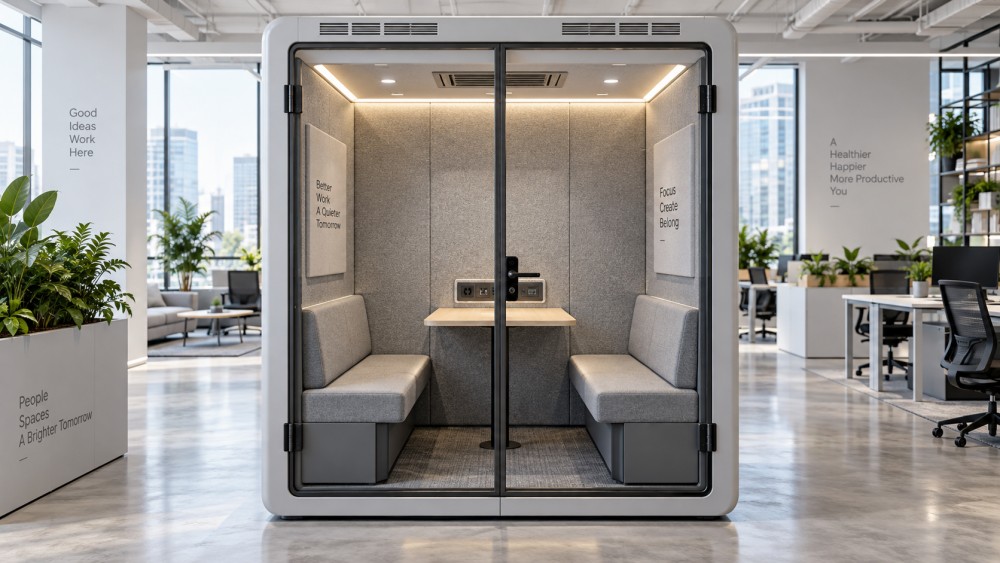
Ventilation is not an optional comfort feature
A well-designed acoustic pod uses ventilation to make an enclosed space comfortable without creating an obvious acoustic weak point. Fans, grilles, ducts, filters where fitted, and control modules all need attention. When these parts are ignored, the first complaint may be that the pod feels stuffy. The more serious issue is that users may start leaving the door open during calls or avoiding the pod altogether, defeating the reason it was installed.
During routine inspection, listen to the fan system rather than only checking whether it is running. A change in tone, rattling, vibration, intermittent operation, or reduced airflow can indicate dust accumulation, a loose component, or a worn fan assembly. Do not assume that a louder fan is “normal” in a busy office. It can interfere with speech clarity in a phone booth and make the pod feel less calm than the surrounding workspace.
External air intakes and exhaust grilles should remain clear of paper, packaging, coat hooks, stored boxes, and improvised signage. This sounds basic, yet pods are frequently placed near workstation storage or circulation routes where clutter builds up. If the pod includes filters, replacement intervals should follow the manufacturer’s instructions and local operating conditions. A pod located near a building entrance, workshop area, or high-traffic transit zone may accumulate dust differently from one in a controlled corporate floorplate.
Where ventilation performance is tied to occupancy sensing, test the system with the door closed and a user inside. A light turning on is not proof that the complete airflow sequence is working. The practical check is whether the fan starts, whether airflow can be felt or heard as intended, and whether it returns to its standby state after the pod is vacant.
Cleaning should protect materials, not just make the pod look clean
Office pods receive concentrated use. A single-person booth may host back-to-back video calls all day, while a four-person meeting pod can collect fingerprints, coffee marks, chair scuffs, and cable clutter within a week. Cleaning therefore has to cover the touchpoints people actually use: handles, worktops, switches, seats, armrests, glass, charging ports, and interior controls.
For hard surfaces, use cleaning products that are compatible with the laminate, metal finish, glass, or plastic specified by the manufacturer. Spray should be applied to a cloth rather than directly into a power module, control panel, vent, or USB opening. Excess liquid near electrical components is an avoidable risk. It is also wise to make sure that cleaning teams understand the difference between an acoustic textile and a conventional wipe-clean wall finish.
Upholstered seating requires particular judgment. Vacuuming removes dust and loose debris; it does not address every stain. Before using spot cleaners, confirm fabric compatibility and test an inconspicuous area where possible. Over-cleaning can create water marks or leave visible patches on fabric panels. In a shared workplace, clear rules about food and drinks inside pods often prevent more damage than any cleaning product can solve.
Check power, lighting, and digital functions as workplace equipment
Modern pods commonly include mains sockets, USB charging, LED lighting, occupancy sensors, wireless chargers, display connections, or booking panels. These features make the pod useful, but they also change the maintenance responsibility. A failed outlet may appear minor until a user cannot complete a video call because their laptop battery is low.
Facility teams should visually inspect power modules for loose faceplates, cracked housings, discoloration, damaged cables, or debris inside ports. Any electrical fault should be isolated and handled by an appropriately qualified person under the applicable local electrical requirements. Pod panels should not be removed casually to investigate wiring; many units have concealed cable routing and ventilation components behind finished surfaces.
Lighting deserves a functional test as well. Check that lights activate consistently, do not flicker, and provide usable illumination for reading notes or joining a video call. If the pod has automatic lighting controls, test sensor response from outside and inside the booth. For booking systems, confirm that the displayed status reflects actual availability. A room reservation platform that says “available” while the pod is occupied creates friction quickly in a hybrid office.
Where pods are integrated with workplace software, maintenance may involve IT as much as facilities. Network settings, firmware updates, device permissions, and booking-platform integrations should have a clear owner. The physical booth may be under a facilities contract, while the connected screen is managed by IT. If neither team owns the full user journey, small faults can remain unresolved for months.
A practical maintenance rhythm for busy offices
There is no universal service interval for every acoustic pod. A lightly used executive-office booth does not wear at the same rate as a pod on a dense, hot-desking floor. Still, the following framework gives workplace teams a sensible starting point. Adjust it after the first few months of actual use rather than treating it as a fixed rule.
Do not overlook the pod’s location and surrounding furniture
Some pod problems are installation or planning problems disguised as maintenance problems. A booth positioned close to a noisy printer bank, pantry door, lift lobby, or main circulation path may receive more external sound than expected. A pod placed under a strong air-conditioning outlet may feel drafty even when its internal ventilation works correctly. These conditions cannot be corrected by cleaning the panels.
The surrounding workspace also affects wear. Nearby sit-stand desks, mobile pedestals, training tables, and lounge seating can create collision risks in reconfigured offices. If cleaning equipment or delivery carts regularly strike the pod base, door frame, or glazing, record the issue and revise the layout. Small impact damage can later affect alignment and sealing.
This is one reason acoustic pod maintenance should sit within a broader workplace asset plan. The same team reviewing ergonomic chairs, desk controls, cable management, partitions, and public seating should understand how people move through the floor. OEAS-related workplace planning is not only about selecting individual products; it is about keeping interconnected furniture and acoustic systems usable over time.
Common mistakes that shorten pod life
The most common mistake is waiting for a user complaint before inspecting the pod. By then, a loose hinge may have already damaged the latch area, or a neglected ventilation grille may have become a comfort issue across several booths. Another is using a generic maintenance checklist that treats the pod like a meeting-room table. Pods have doors, sealed joints, electrical components, and airflow systems that need their own checks.
It is also risky to make unauthorized modifications. Drilling through panels to add hooks, screens, shelves, or cable routes can affect finishes, concealed wiring, acoustic layers, and warranty conditions. Even apparently harmless additions should be reviewed against the pod manufacturer’s installation guidance. The same caution applies when moving a pod during an office reconfiguration. Many acoustic booths require defined handling methods and, in some cases, professional disassembly and reinstallation.
Good maintenance is less about constant intervention and more about noticing the right signals: a door that no longer closes quietly, a fan that sounds different, a seat fabric that is being cleaned too aggressively, or a booking display that has stopped matching reality. Keep a simple fault log, assign ownership across facilities and IT where needed, and retain supplier manuals and spare-part details. That discipline preserves the quiet, privacy, and everyday usefulness that justified the pod investment in the first place.
Have questions about the global trade trends discussed here, or planning your expansion and supply chain strategy? Leave a message below and let the trade experts at OEAS guide you.
We respect your privacy. Your information is strictly confidential.
Related News
- Choosing Soundproof Meeting Pods: Privacy, Ventilation, and CapacityOct 19, 2026Compare soundproof office pods for meeting rooms with confidence. Discover how to assess speech privacy, ventilation, fan noise, and real capacity before you buy.
- How to specify an office pod acoustic fitout for speech privacySep 27, 2026Office pod acoustic fitout guide: specify doors, glazing, ventilation, seals and testing to achieve reliable speech privacy for confidential workplace conversations.
- What Maintenance Do Acoustic Office Pods Require?Sep 22, 2026What maintenance do acoustic office pods require? Discover practical cleaning, ventilation, acoustic seal, power, and service tips to protect privacy and extend pod life.
- How to Specify Dual-Glazed Office Pods for Privacy, Acoustics, and HVACAug 31, 2026Dual-glazed office pods: learn how to specify privacy, acoustic performance, quiet HVAC, compliance, and maintenance for a successful workplace rollout.
Related News
- 00
0000-00
Mordor: Furniture Market to Reach $987.8 Billion by 2032 as Hybrid Work Drives Demand - 00
0000-00
What Does a Posture Ergonomics Consultant Do for Office Workers? - 00
0000-00
IndexBox Forecasts 6.5% Annual Growth for Global Office Sit-Stand Desk Market - 00
0000-00
Ergonomic Chair Mechanisms: Synchro-Tilt vs. Knee-Tilt for Office Work - 00
0000-00
Mesh Office Chairs: What to Look for in Ergonomic Lumbar Support
Weekly Insights
Stay ahead with our curated technology reports delivered every Monday.